
To recover from disasters, it’s essential you back up your personal archives digitally and store originals securely. Scan important documents, photos, and keepsakes, then upload them to reliable cloud services with encryption and backup features. Also, keep physical items like family heirlooms in fireproof safes and consider off-site storage for extra protection. Regularly review and update your storage strategies, so you’re prepared for any emergency—there’s more to guarantee complete protection if you keep exploring.
Key Takeaways
- Digitize important documents and photos to create secure, easily accessible digital copies stored in reliable cloud services.
- Use fireproof, waterproof safes and consider off-site storage for physical items to prevent loss from disasters.
- Maintain an organized inventory of stored items and regularly review both digital backups and physical storage conditions.
- Implement a layered disaster plan combining digital backups and physical protection for comprehensive risk mitigation.
- Educate yourself on disaster response procedures to quickly recover and safeguard personal archives during emergencies.

Disasters can strike unexpectedly, threatening your valuable personal archives and threatening years of memories, documents, and treasured keepsakes. When disaster hits—be it fire, flood, or theft—your first concern is how to protect your irreplaceable items. One effective way is to use a combination of cloud backup and physical storage. Cloud backup offers a remote, secure place to store digital copies of your important files, photos, and documents. It’s quick to access and easy to update, ensuring that even if your physical items are lost or damaged, you still have a digital version safe elsewhere. Physical storage, on the other hand, involves keeping original items—such as photographs, heirlooms, or important paper documents—in a physically secure location, preferably away from potential disaster zones. This dual approach helps safeguard your archives from multiple threats, giving you peace of mind.
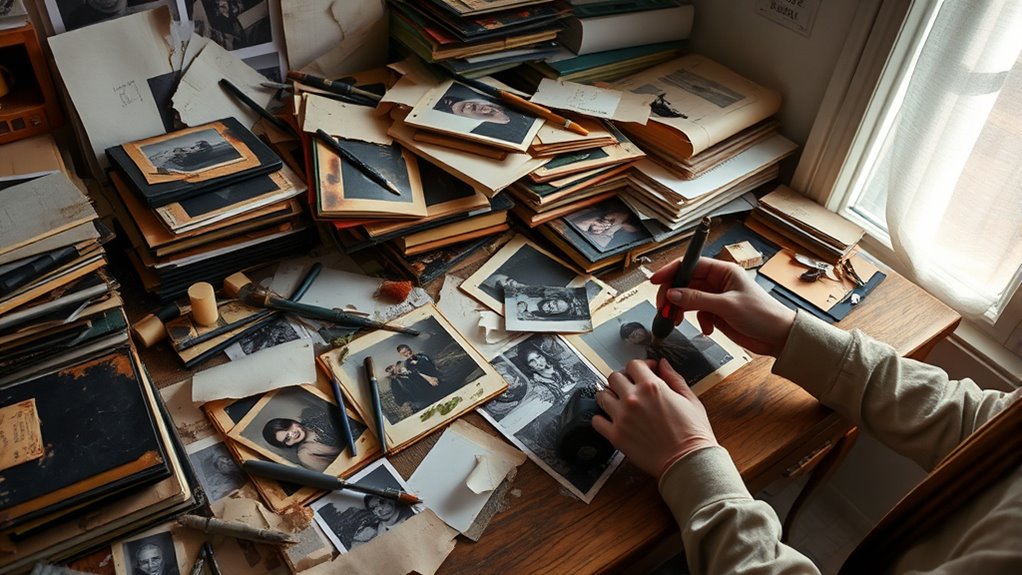
You should start by digitizing your most precious items. Scan photographs, documents, and keepsakes and upload these files to a reliable cloud backup service. This process ensures that, even if your physical collection is compromised, your memories are preserved in a digital format that’s accessible from anywhere. Make sure your cloud storage provider offers encryption and automatic backups, so your data stays protected and always up-to-date. For your physical storage, consider investing in fireproof and waterproof safes, especially for irreplaceable items like birth certificates, family heirlooms, or sentimental keepsakes. Store these safes in a secure, discreet location, ideally off-site or in a different part of your home, to reduce the risk of losing everything in one incident. Additionally, understanding disaster preparedness can help you develop a comprehensive plan for protecting your archives.
It’s also wise to regularly update your backups and review your physical storage arrangements. Over time, digital files may need organizing or revitalizing, and physical storage conditions should be checked for signs of deterioration or damage. Keep a list of what’s stored where, and consider photographing your physical items for added documentation. Educate yourself about the best practices for disaster preparedness and recovery, so you know how to act swiftly if disaster strikes. Remember, the key is to diversify your protection methods—relying solely on physical storage or cloud backup isn’t enough. Combining these strategies provides a layered defense that maximizes your chances of recovering your personal archives, no matter what happens. Acting now can save you from heartache later and ensure your memories and essential documents survive, intact, for generations to come.
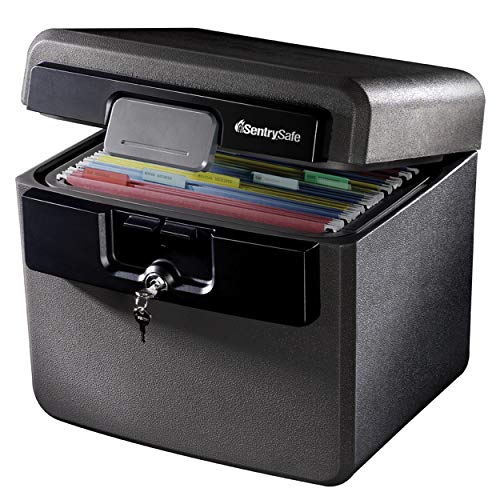
SentrySafe Black Fireproof and Waterproof Safe, File Folder and Document Box with Key Lock, Ex. 14.3 x 15.5 x 13.5 inches, HD4100
FIREPROOF: Safe is UL Classified to endure 1/2 hour at 1550°F and keep interior temperatures safe for irreplaceable…
As an affiliate, we earn on qualifying purchases.
As an affiliate, we earn on qualifying purchases.
Frequently Asked Questions
How Often Should I Back up My Personal Archives?
You should back up your personal archives regularly, ideally setting a backup frequency of weekly or bi-weekly to guarantee your data stays current. Establish an archival schedule that aligns with how often you add or change files, and consider automating backups to avoid missing important updates. Frequent backups help prevent data loss, so stick to a consistent routine that keeps your personal archives safe and up-to-date.
What Is the Best Storage Medium for Long-Term Preservation?
They say, “Don’t put all your eggs in one basket,” and that’s true for long-term data storage. Physical media like external hard drives or archival-quality DVDs offer reliable options, especially when combined with data redundancy. Using multiple storage mediums guarantees your personal archives stay safe over time. Choose durable, high-quality physical media, and regularly update backups to protect your memories for decades to come.
How Can I Recover Files From a Corrupted Backup?
To recover files from a corrupted backup, you should first try using specialized corrupted backup recovery tools or file repair software. If that doesn’t work, consider restoring files from an earlier version if available. Implement file restoration strategies like creating multiple backup copies and testing them regularly. Always keep your backups updated and stored in different locations to minimize data loss and simplify recovery when issues arise.
Are There Affordable Cloud Options for Personal Archive Storage?
Yes, you can find affordable cloud storage options for your personal archives. But beware—some solutions might seem cost-effective at first glance, yet hide hidden fees or limited space. Explore reliable providers like Google Drive, Dropbox, or OneDrive, which offer scalable plans that fit different budgets. By selecting the right plan, you guarantee your files stay safe without breaking the bank, giving you peace of mind for years to come.
How Do I Organize Digital Archives for Easy Recovery?
To organize your digital archives for easy recovery, start by using clear, consistent naming conventions and applying metadata management to tag files with keywords, dates, and categories. Create an archive indexing system—such as folders or databases—that groups related files logically. Regularly update and back up your index, ensuring you can quickly locate essential documents. This method boosts retrieval speed and keeps your personal archive well-structured and accessible.

Nero BackItUp – Data Backup Software | Automatic Backup, Data Recovery, Cloud Backup, Fully Automated | Lifetime License | 1 PC | Windows 11/10/8/7
✔️ One-time Payment, Lifetime Use: Unlike subscription-based services, pay once and enjoy lifetime use without recurring costs.
As an affiliate, we earn on qualifying purchases.
As an affiliate, we earn on qualifying purchases.
Conclusion
Think of your personal archives as a delicate garden, blooming with memories and moments. When disaster strikes, it’s like a storm threatening to wipe away those precious flowers. But with a solid recovery plan, you hold the keys to shelter and nurture your garden back to life. Your careful preparations are the steady sunlight and nourishing rain—guiding you through the storm toward renewal. Protect your archive, and let your memories blossom forever.

Hczrc Portable Scanner, Photo Scanner for A4 Documents, Handheld Scanner for Business, Photo, Picture, Receipts, Books, JPG/PDF Format Selection, UP to 900 DPI, with 16G SD Car
Note: No software installation is required. You need 2 AA batteries ( not included) and a memory card…
As an affiliate, we earn on qualifying purchases.
As an affiliate, we earn on qualifying purchases.

REOLINK 4K LTE Cellular Security Camera Wireless Outdoor, No WiFi 3G/4G Solar Powered, 360 Auto Tracking AI Detection, Color Night Vision, Cloud/512G Local Storage, SIM Card Included, Go PT Ultra+SP2
Incredible 4K Images Day & Night: The first-ever 4K 4G camera can capture clear images and videos with…
As an affiliate, we earn on qualifying purchases.
As an affiliate, we earn on qualifying purchases.