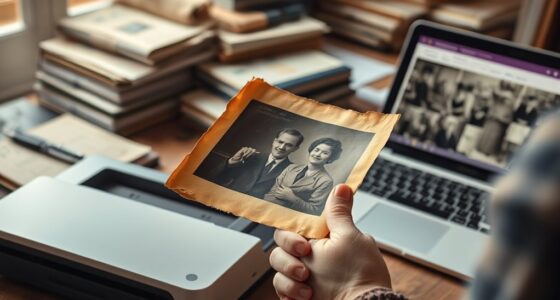

To preserve color and detail in scanned photos, start by performing digital color correction to restore vibrancy and balance brightness, contrast, and saturation. Save your images in lossless formats like TIFF and add color profiles or metadata for consistency. Keep backups in multiple locations and update storage media regularly. Limit edits to avoid artifacts, and use professional tools for precise adjustments. For more tips, discover how combining these steps can ensure your images stay vibrant over time.
Key Takeaways
- Convert scanned images to lossless formats like TIFF to prevent quality degradation during editing and storage.
- Use accurate color profiles and calibration tools to maintain true color reproduction.
- Apply careful digital color correction to restore vibrancy without introducing artifacts.
- Store digital files in multiple secure locations with regular backups to ensure long-term preservation.
- Keep editing software updated to maintain compatibility and prevent data loss over time.
Scanning old photos can help preserve your memories, but the colors often fade or shift over time. To combat this, you need to understand the importance of digital color correction. This process allows you to adjust the colors in your scanned images, restoring them to their original vibrancy and guaranteeing they look just as they did when the photos were taken. Using digital color correction tools effectively can make a significant difference in how true-to-life your digital copies appear. It’s about balancing brightness, contrast, and color saturation to bring out details that might be lost in the fading process. When done carefully, this technique revives the image’s original feel while also protecting it from further deterioration. Additionally, understanding the role of color accuracy in digital imaging can help you achieve more precise restorations.
In addition to digital color correction, applying archival preservation techniques plays a vital role in maintaining the quality of your scanned photos over time. These methods go beyond simple editing and focus on safeguarding your digital images from future damage. For instance, converting your photos into high-quality, lossless file formats like TIFF ensures that the image data remains intact, without compression artifacts that degrade quality. Storing your files in a cloud-based or external hard drive with proper backups further secures your memories against hardware failures or accidental deletions. Consider also using color profiles and metadata embedding to maintain consistent color reproduction across different devices and platforms. These steps make your digital archive more resilient and easier to access and share without losing detail or color accuracy.
When you combine digital color correction with archival preservation techniques, you create a complete approach to safeguarding your photographic history. This isn’t just about making your images look good—it’s about ensuring they stand the test of time. Regularly updating your storage media, keeping your software current, and avoiding excessive editing that can introduce artifacts are all part of good preservation practices. It’s also wise to create multiple copies of your digitized photos and store them in different locations. This way, if one file becomes corrupted or lost, you still have access to high-quality backups. Ultimately, your goal is to preserve the integrity of your images in both appearance and data, so future generations can enjoy the stories captured in each photograph.

Epson Workforce ES-400 II Color Duplex Desktop Document Scanner for PC and Mac with Auto Doc Feeder (ADF), Image Adjustment Tools
FAST DOCUMENT SCANNING – Speed through stacks with the 50-sheet Auto Document Feeder, perfect for office scanning and...
As an affiliate, we earn on qualifying purchases.
Frequently Asked Questions
How Does Scanner Quality Affect Color Preservation?
Your scanner quality directly impacts color preservation through factors like color calibration and scanner resolution. A high-resolution scanner captures more detail, ensuring colors stay true and sharp, while proper color calibration adjusts for color accuracy during the scan. If your scanner lacks these features or has low resolution, colors may appear dull or inaccurate, making it harder to preserve the original look of your photos. Investing in quality equipment makes a noticeable difference.
Can Color Correction Be Done After Scanning?
Think of your scanned photo as a canvas needing a fresh coat of paint. Yes, you can do color correction after scanning. Using tools for post scan editing, you can adjust colors, improve calibration, and bring back vibrancy. Color calibration helps ensure accurate hues, so you’ll want to fine-tune these settings during editing. This process restores the image’s original brilliance, making sure your memories look just as vivid as when they were captured.
What File Formats Best Retain Color and Detail?
To best retain color and detail, you should save your scanned photos in lossless formats like TIFF or PNG. These formats support proper color calibration and prevent file compression from diminishing quality. Avoid JPEGs for archival purposes, as their lossy compression can degrade details and colors over time. Using TIFF or PNG ensures your images stay vibrant and sharp for future editing or printing, maintaining their original quality.
How Do Lighting Conditions Impact Scan Quality?
Lighting conditions greatly impact your scan quality. You should guarantee light source consistency to avoid uneven exposure, which can cause color shifts and loss of detail. Ambient light influence can introduce glare or shadows, reducing clarity. Use controlled, diffuse lighting and avoid fluctuating light sources during scanning. Proper lighting setup helps preserve the original colors and fine details, resulting in clearer, more accurate digital reproductions of your photos.
Are There Specific Settings to Enhance Detail During Scanning?
To enhance detail during scanning, you should increase the scan resolution and set a higher color depth. Use a resolution of at least 300-600 dpi for sharp, detailed images, especially for prints or photos with fine detail. Adjust the color depth to 24-bit or higher, which preserves more color information and richness. These settings help capture the full detail and vibrant colors of your photos, ensuring they look their best after scanning.

ScanSnap iX2500 Wireless or USB High-Speed Cloud Enabled Document, Photo & Receipt Scanner with Large 5" Touchscreen and 100 Page Auto Document Feeder for Mac or PC, Black
OUR MOST ADVANCED SCANSNAP. Large touchscreen, fast 45ppm double-sided scanning, 100-sheet document feeder, Wi-Fi and USB connectivity, automatic...
As an affiliate, we earn on qualifying purchases.
Conclusion
By following these tips, you’ll keep your scanned photos vibrant and sharp, like a jewel shining through time. Remember, handling your images with care and using proper software is like watering a delicate plant—your photos will flourish and retain their beauty for generations. Don’t let your precious memories fade into the background; instead, give them the attention they deserve, turning your digital collection into a timeless gallery that’s as vivid as the day it was captured.

Epson WorkForce ES-50 Portable Sheet-Fed Document Scanner for PC and Mac
Fastest and lightest mobile single sheet fed document scanner in its class(1) small, portable scanner ideal for easy,...
As an affiliate, we earn on qualifying purchases.

Epson Workforce ES-580W Wireless Color Duplex Tax Receipt & Desktop Document Scanner for PC and Mac with 100-sheet Auto Feeder (ADF), Intuitive 4.3' Touchscreen
EFFORTLESS WIRELESS SCANNING – With a 4.3" touchscreen and wireless connectivity, this high-speed scanner sends scans straight to...
As an affiliate, we earn on qualifying purchases.