
TL;DR
Open a free Amazon Business account
Business pricing, bulk buying and tax-exempt orders.
Create a free accountAs an affiliate, we earn on qualifying purchases.
Buying a prebuilt AI workstation is often faster and less risky than building from scratch, especially amid component shortages. However, building offers full control and customization, crucial for specific needs. The best choice depends on your timeline, budget, and expertise.
Imagine powering up your AI project and having everything ready in minutes. No fiddling with BIOS, no hunting for drivers, no thermal tuning. That’s the promise of a prebuilt AI workstation in 2026. But is it always the smarter choice? Or does building your own still hold hidden advantages?
This article cuts through the hype. You’ll learn what really matters—costs, speed, control, and future-proofing—so you can decide which route aligns with your goals. Whether you’re a hobbyist, researcher, or enterprise team, the decision isn’t as simple as it used to be. The landscape has shifted, and your choices now reflect the new realities of supply chains and AI economics.
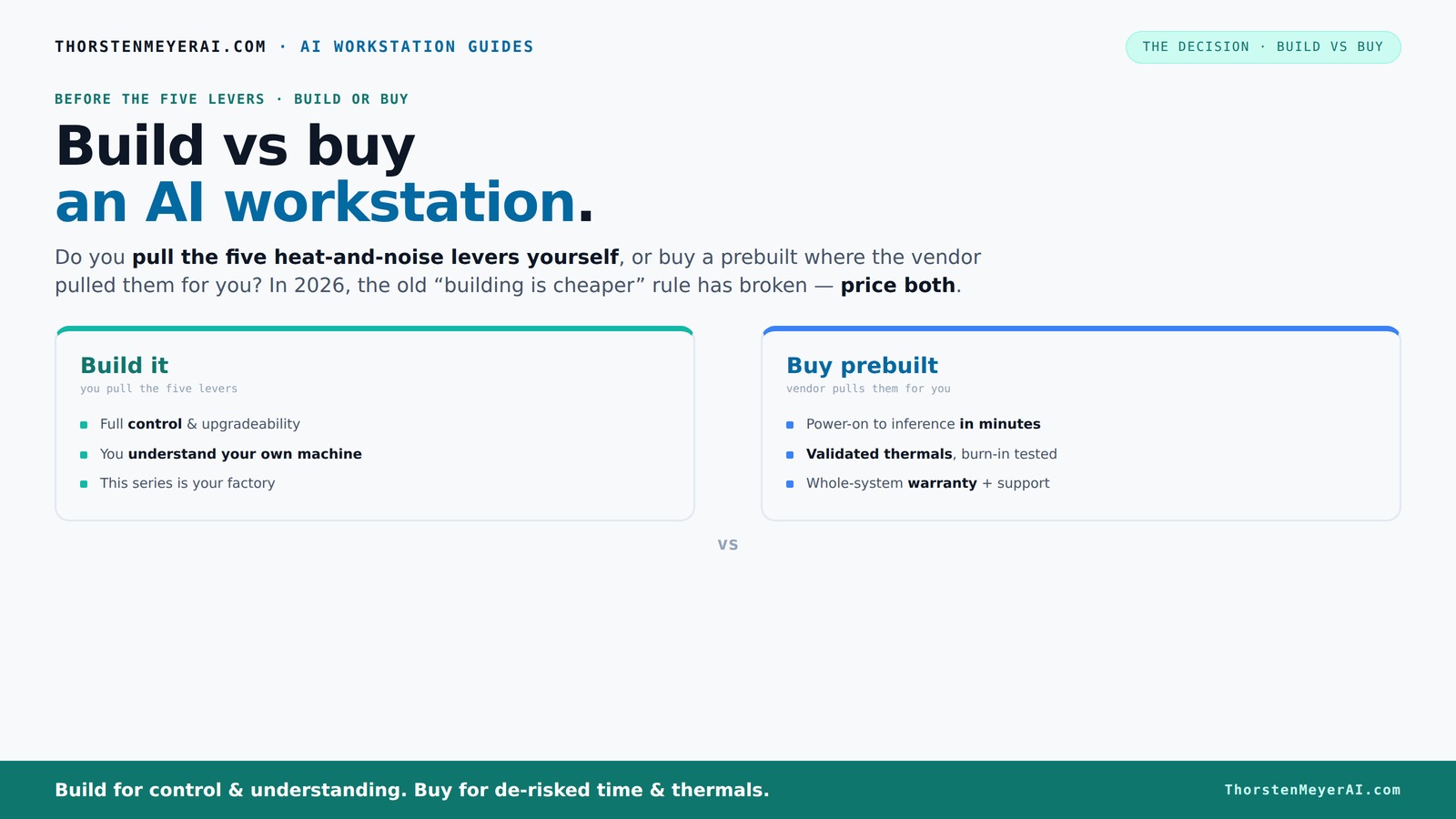
Build vs buy
an AI workstation.
The real question behind this whole series: do you pull the five heat-and-noise levers yourself, or buy a prebuilt where the vendor pulled them for you? And in 2026, the old “building is cheaper” rule has broken. Match your situation in Part 3.
Key Takeaways
- Component shortages and market shifts mean prebuilt AI workstations can now match or beat DIY costs, especially when factoring in time and effort.
- Fast deployment makes prebuilt systems ideal for projects with tight timelines, reducing setup from months to hours.
- DIY offers unmatched control over hardware, cooling, and future upgrades—perfect for highly customized or security-sensitive workloads.
- Support, warranty, and validated thermal management are significant benefits of buying—especially for mission-critical AI tasks.
- A hybrid approach—buy the base, customize on top—is increasingly the smart choice for balancing speed, cost, and control.
As an affiliate, we earn on qualifying purchases.
Why 2026 Changes the Build-vs-Buy Game — It’s Not Just About Cost
For years, building your own AI workstation was the clear winner on price. You bought parts, assembled, and saved money. Not anymore. Component shortages and skyrocketing prices—especially for GPUs, DDR5 RAM, and SSDs—have pushed DIY costs above prebuilt options.
Major vendors like Lambda and Puget Systems have secured bulk deals and optimized their manufacturing processes. Their prebuilt systems now often cost the same or less than sourcing parts yourself, especially when you include the time and expertise needed to assemble and tune.
So, the old rule—"build cheaper"—no longer holds. Now, it’s about what saves you time, reduces risk, and fits your operational goals.
This shift isn't just about immediate costs; it influences strategic decisions. For instance, organizations might prioritize rapid deployment over cost savings, especially when delays can stall project timelines or impact revenue. The tradeoff becomes clear: is the potential saving worth the longer setup time, or does the faster deployment of prebuilt systems outweigh the cost difference? Understanding these implications helps organizations align their procurement with their operational priorities.
As an affiliate, we earn on qualifying purchases.
How Quickly Can You Get Started? Deployment Speed Matters
Buying a prebuilt AI workstation means plugging in and going. Most systems arrive with the OS, CUDA, TensorFlow, and other frameworks preinstalled. You’re operational in hours, not weeks.
Building from scratch? Expect a minimum of 4–6 weeks, often more. You’ll source parts, assemble, troubleshoot compatibility, and run extensive testing. This process isn’t just about time; it affects your project’s agility.
In scenarios like a startup needing to prototype an AI model within days, prebuilt systems aren’t just convenient—they’re essential. They enable rapid iteration, allowing teams to focus on development rather than hardware issues. Conversely, if your project timeline is flexible, you might justify the longer build process for the benefits of customization and control.
Ultimately, the speed of deployment impacts your competitive edge. Faster setup means quicker testing, validation, and deployment—crucial factors in fast-moving AI landscapes where time-to-market can define success or failure.
As an affiliate, we earn on qualifying purchases.
Performance and Upgradability — What Do You Really Get?
Prebuilt systems are tuned for stability and thermal management by experts. They often include validated cooling, optimized fan curves, and tested configurations. This means fewer surprises during long training runs and more predictable performance. To learn more about astrophotography, visit astrophotographyhq.com.
Building your own offers full control: you pick the GPU, RAM, cooling, and airflow. But it also means you’re responsible for making sure everything works harmoniously. Missteps in compatibility or thermal setup can lead to performance bottlenecks or hardware failures. Upgradability depends heavily on your motherboard, PSU, and case choices, which can either future-proof your system or limit expansion. For instance, a DIY rig might support dual GPUs and custom cooling, but only if you plan for it in advance. This flexibility is powerful but requires expertise to execute correctly.
Choosing between the two involves weighing the reliability and ease of pre-tuned systems against the potential for tailored performance and future upgrades in custom builds. Strategic planning becomes essential if you anticipate needing larger GPUs or additional memory down the line, as upfront choices impact long-term scalability.
As an affiliate, we earn on qualifying purchases.
Security, Support, and Long-Term Reliability
Prebuilt vendors often include warranties, on-site support, and validated thermal testing. These features reduce the risk of hardware failures and minimize downtime, which is vital for mission-critical AI workloads. For example, Lambda offers comprehensive support plans that cover hardware repairs, replacements, and troubleshooting, giving organizations peace of mind during intensive training cycles.
Building your own means you’re on your own for troubleshooting and repairs. While you can customize hardware for security—like deploying a system with hardware encryption—there’s more hands-on management involved. The tradeoff is that DIY systems may lack the immediate support infrastructure of commercial vendors. This can be a risk if hardware failures occur during critical phases, potentially leading to costly delays.
Support models influence long-term reliability. For instance, enterprise-grade warranties and support plans can extend hardware lifespan and ensure quick resolution of issues, which is crucial given the rapid pace of AI development. For more insights on making better decisions, see haltmal.com.
Control and Customization — How Deep Do You Want to Go?
Building a workstation grants you total control over every component. Want a custom water-cooling loop? You can do that. Need a specific airflow setup? It’s yours to design. This level of control allows you to optimize for noise.rmal performance, and future upgrades tailored precisely to your workload.
Prebuilts are generally optimized for performance and plug-and-play convenience, but they come with limited options for radical customization. They’re designed to meet a broad audience, which means tradeoffs in thermal design, airflow, and component choices. For example, a researcher needing a very quiet, custom-cooled system might find prebuilt options inadequate, whereas a developer prioritizing quick setup and reliability might prefer preconfigured solutions. The tradeoff is between the depth of control and the time/skills required to implement it. Building your own is ideal if you want to push hardware boundaries or implement niche cooling solutions, but it demands expertise and careful planning.
When Should You Build, and When Should You Buy?
Use this quick checklist to decide:
- Speed to deployment: Need rapid start? Buy.
- Budget constraints: Tight on cash? Compare costs carefully.
- Customization needs: Require specific cooling, airflow, or hardware tweaks? Build.
- Long-term control: Want full ownership of upgrades and security? Build.
- Support and risk: Need guaranteed support? Buy.
In 2026, many organizations adopt a hybrid approach: buy the base platform, then customize or tune on top. This approach balances the immediate benefits of prebuilt systems with the flexibility of custom upgrades, allowing teams to optimize for their unique needs without sacrificing speed or control. It also mitigates risks associated with supply chain uncertainties and component shortages, enabling a strategic blend of efficiency and adaptability.
Frequently Asked Questions
Is it cheaper to build or buy a prebuilt AI workstation?
In 2026, component shortages and bulk purchasing often make prebuilt workstations cost the same or less than building your own, especially when you include the time and effort involved in sourcing and assembling parts [2].How much faster is buying than building?
Prebuilt systems can be operational within hours of arrival, while building from scratch typically takes 4–6 weeks or more, including sourcing, assembly, and testing [3]. This speed difference is critical in fast-paced AI development, where delays can cost opportunities and competitive advantage.What specs matter most for AI workstations?
GPU power (like NVIDIA RTX 4090 or A100), RAM (64GB+), fast SSDs, and efficient cooling are key. The right combination depends on your workload, but GPU choice is usually the most critical factor [4]. Selecting high-performance components ensures your system can handle demanding AI models and large datasets effectively.When does it make sense to build instead of buying?
If you need a highly customized cooling setup, specific hardware integration, or want full control over upgrades, building is the way to go—especially if you enjoy the process and have the expertise [5]. Custom builds allow tailoring every aspect, from thermal management to security features, aligning hardware precisely with your operational needs.Will a prebuilt workstation limit future upgrades?
Often, prebuilt systems are designed for some expandability, but you may face restrictions based on motherboard and case choices. Building your own can give you more future-proofing options, such as supporting newer GPUs, additional RAM, or custom cooling solutions, ensuring your investment remains relevant longer.Conclusion
In 2026, your decision to build or buy hinges less on cost and more on your priorities—speed, control, and risk. Buying a prebuilt system can save you days or weeks, letting you focus on your AI work. But if you crave full control and customization, building remains a powerful option—just be prepared for the time and expertise involved.
Ultimately, choose what aligns with your goals. And remember: in the fast-evolving AI landscape, flexibility and strategic thinking matter more than ever.
Flea & tick season Picks
flea and tick prevention
As an affiliate, we earn on qualifying purchases.